What a campaign is
A campaign is one message sent to a list of companies, through the contact form on each company's own website. You choose the companies and write the message. We type your message into each form and send it, then show you what happened.
A good first campaign is small and focused: one type of company, one country and one message. You learn which words and which companies get answers, and you can use that in the next campaign.
What to have ready
- An idea of who you want to reach. A type of company and a country. Our guide to building a target list helps you decide.
- Your message. Short, in your reader's language, with one clear ask. See how to write a contact form message.
- Your sender details. Your name, company and contact details, as companies will see them.
- Credit. A top-up of $10 or more.
Step 1: Top up
Add credit from $10. There is no subscription and no seat fee. Credit never expires, so a larger top-up is never wasted.
You can also turn on automatic top-up, or a low balance email that tells you in time to add credit yourself.
Step 2: Choose the companies
There are two ways in:
- We find the companies. Type what the companies do, like “packaging machines”, and pick a country. We collect the company websites that rank on search engines today for those keywords in that country. The search has its own cost, shown before you start, and unused money comes back when the campaign ends. See how to find companies by keyword.
- You bring the list. Paste web addresses, upload a spreadsheet (Excel or CSV), or start from a saved list. A website like example.com is enough, and there is no search cost.
Either way, look down the list and take off any company that does not fit.
Step 3: Write your message
Write it once, in any language, and choose your sender details. It is sent exactly as you wrote it. The app does not translate it, so write it in the language your companies read. Need a starting point? See our message examples.
Step 4: Check and approve the list
Approving the list means checking everything and giving the go-ahead. Before anything is sent, the app shows you:
- how many companies are ready to contact,
- how much credit is set aside for the campaign,
- which companies are left out, and why, such as no usable contact form.
Take off any company you do not want to contact. Then confirm that your organisation may contact each company on the list. Companies on your do-not-contact list are always skipped. Rules differ by country, so read Is contact form outreach legal? if you are not sure.
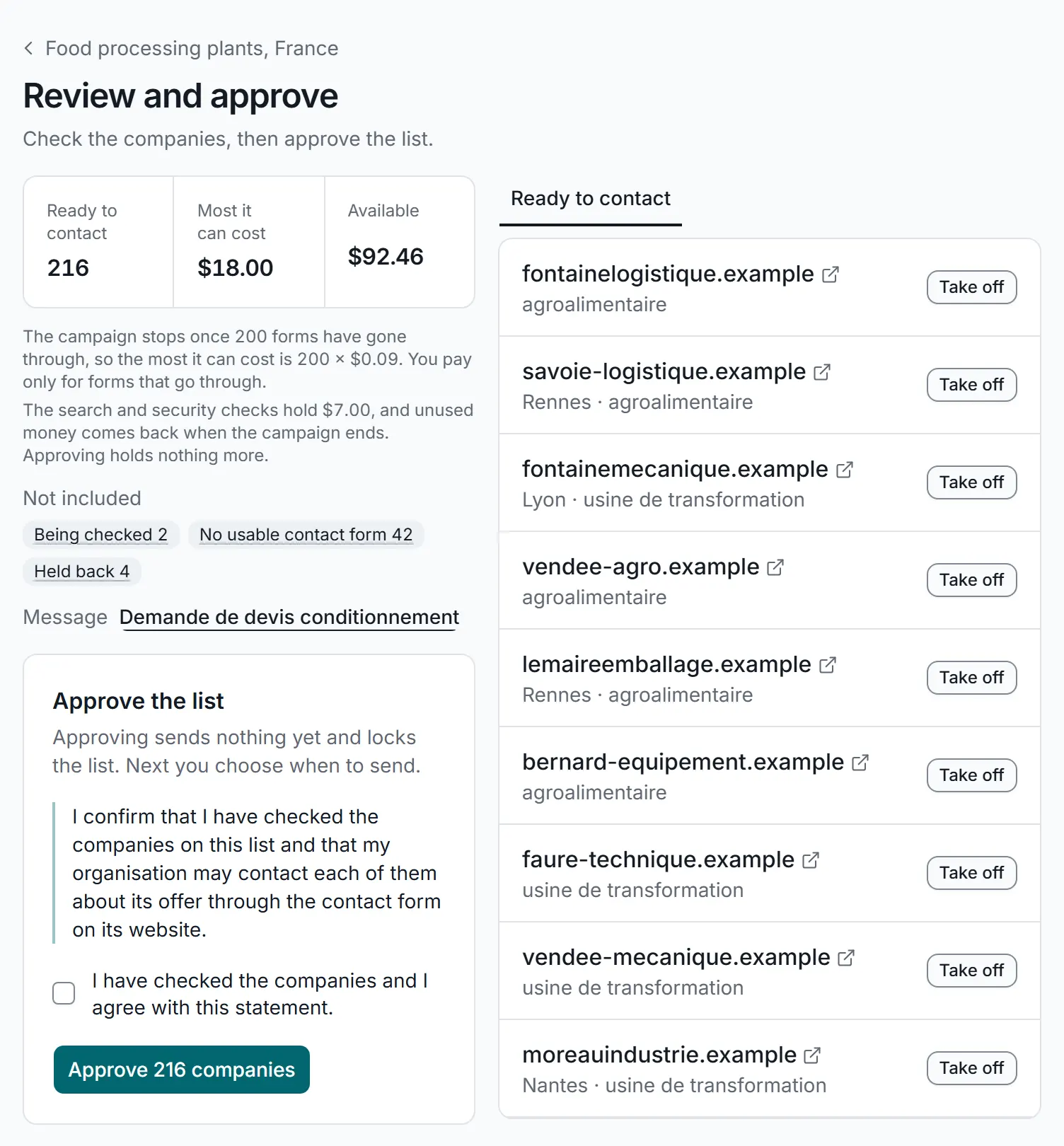
Checking the list before approving it. A real screen from the app, with sample data.
Good to knowApproving the list sends nothing. It locks the list, and you send the campaign next.
Step 5: Send
Each company gets your message once, through the contact form on its own website, during office hours in its country. You can stop a campaign at any time.
What $10 pays for
Each form that goes through costs $0.09. So $10 covers about 111 forms that go through, and larger top-ups cover more:
- $10covers about 111 forms that go through
- $50covers about 555 forms that go through
- $100covers about 1,111 forms that go through
These numbers are for the forms alone. When we find the companies for you, the search has its own cost, shown before you start, and unused money comes back when the campaign ends. With your own list there is no search cost.
If a website is down or gone, has no contact form, or its form rejects the message, you are not charged and the credit goes back. Some forms ask a security question before they send. A campaign only pays for help with those if you set an amount for it, and never spends more than that. A form that does not go through costs nothing. You do pay for each form that goes through, whether or not the company answers. See Pricing for the full details.
What you get back
- Proof of delivery. For each delivered message, a picture of the form filled in and of the page the site showed after sending, with the page address, date and time.
- A contact list. The emails, landlines, mobiles and WhatsApp numbers each site lists, with named people where the site lists them. Download them as Excel or CSV.
- One inbox for replies. Answers are matched to their campaign and company, with automatic replies, bounces and opt-outs sorted for you.
- Results. What was delivered, what the websites confirmed, who replied, and a plain reason for every company not reached.
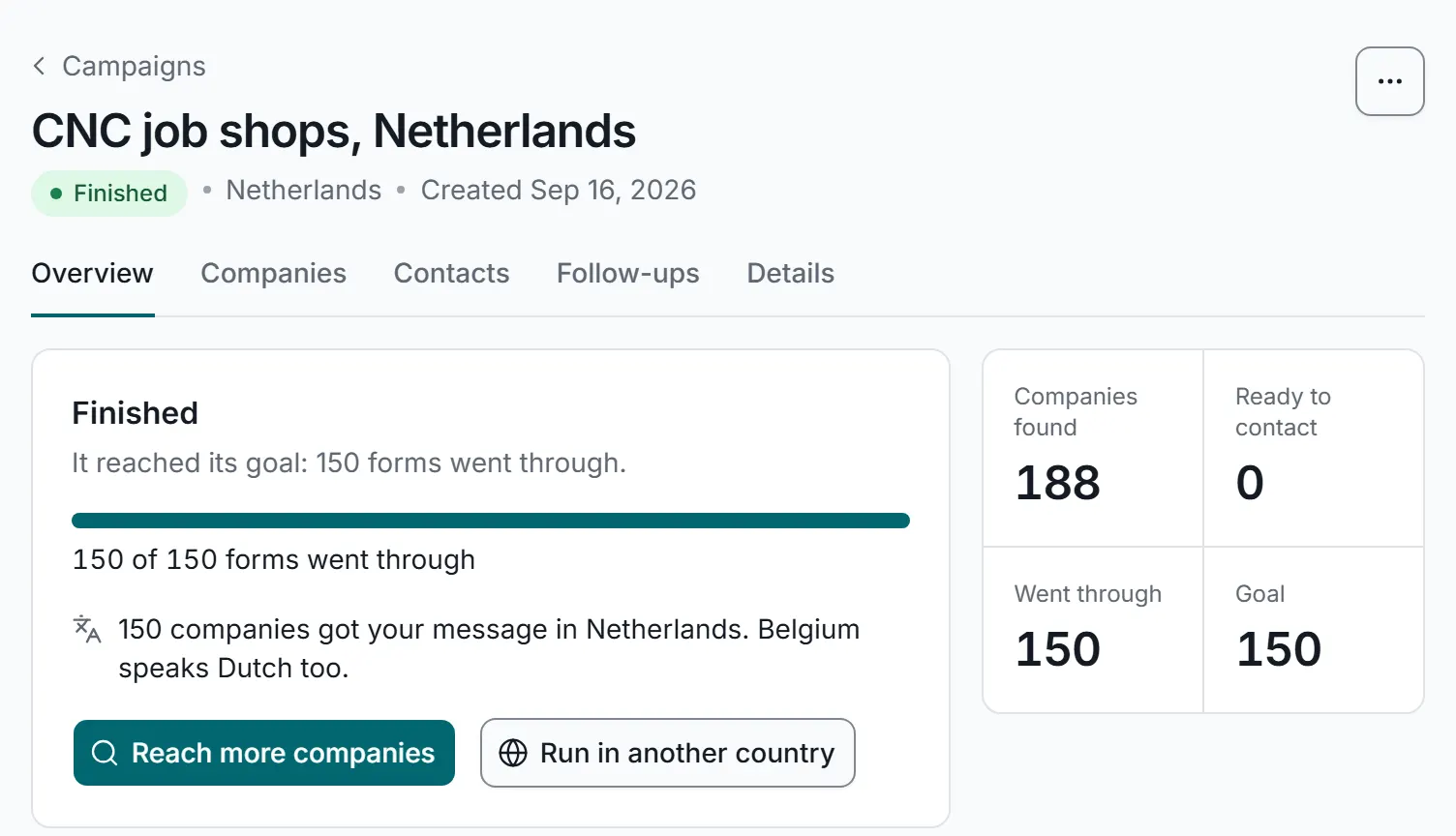
The results of a finished campaign. A real screen from the app, with sample data.
After your first campaign
- Answer any replies from the inbox.
- Follow up with companies that have not answered, using the contacts collected. See how to follow up.
- Reuse what you made. Your list, message and sender details are saved, so your second campaign takes minutes.
- Reach more companies. Find more by keyword, or try a new country in its own language.