What it means
A keyword is a word or short phrase you type into a search engine, like “dental laboratory”. Finding companies by keyword means searching for what a company does, in the country you want, and turning the results into a list of company websites.
That list is what you send to. You do not need names or email addresses. Each company's website, like example.com, is enough.
Doing it by hand
You can do this yourself with an ordinary search engine:
- Set the search engine to the country you want, or add the country or a city to your search.
- Type what the companies do, like “packaging machine maker”.
- Open each result. Check that it is a real company of the right kind, not a directory, a news story or a shop for the public.
- Copy the company's website into a spreadsheet.
- Repeat with other keywords, and remove any company that is on the list twice.
This works, and it is a good way to learn a market. It is also slow, because every company means opening a page, checking it and copying an address. Trade associations, trade fair exhibitor lists and business directories are other good places to look. Our guide to building a target list covers them.
What makes a good keyword
The best keywords name what the company does, in the words it uses about itself.
- Name what they do, not what you sell. If you sell software to dental labs, search “dental laboratory”, not “dental lab software”. The second search finds companies like yours.
- Be specific. “Industrial packaging machines” finds a clearer group than “packaging”, which also finds shops that sell boxes.
- Use the market's own words. Companies describe themselves in their own language. In Spain, “distribuidores de equipos” finds distributors that an English search would miss.
- Try a few versions. People say the same thing in different ways, like “dental laboratory”, “dental lab” and “dental technician”.
- Leave out shopping words. Words like “cheap” or “best” bring up adverts and comparison sites rather than companies.
Narrow it by country and type
A good list is narrow. A company that does not fit is unlikely to answer, and a message written for everyone fits nobody well.
- One country per list. Then you can write in its language and talk about its market.
- One type of company per list. Makers and sellers of the same product need different messages.
- Check it by eye. Look down the list and take off anything that does not fit: directories, big brands that will not be interested, and companies you already work with.
If you want two countries or two kinds of company, make two lists. Each one gets its own message.
Check what you found
Before you keep a company, look at its website for a moment.
Good signs
- It says clearly what the company does, and that matches your keyword.
- It is in the country you picked, or works there.
- It sells to businesses, or works with them, as your offer needs.
Warning signs
- A page that lists many other companies.
- A website for shoppers rather than businesses.
- A company far bigger or smaller than the ones you usually work with.
Take any company with a warning sign off the list.
How the app does it
In the app, this way in is called “We find the companies”. It does the slow part for you:
- Type your keywords and pick a country. For example, “packaging machines” and France.
- We find the websites. We collect the company websites that rank on search engines today for those keywords in that country. The search has its own cost, and you see it before you start.
- You check the list. Take off any company that does not fit, then save the list or download it as a spreadsheet (Excel or CSV).
- Write your message and approve the list. Nothing is sent until you approve it, and companies on your do-not-contact list are always skipped.
Websites with no usable contact form are left out and counted, with the reason, so you can see why. You pay the search cost you saw before you started, and $0.09 for each form that goes through. Unused money comes back when the campaign ends.
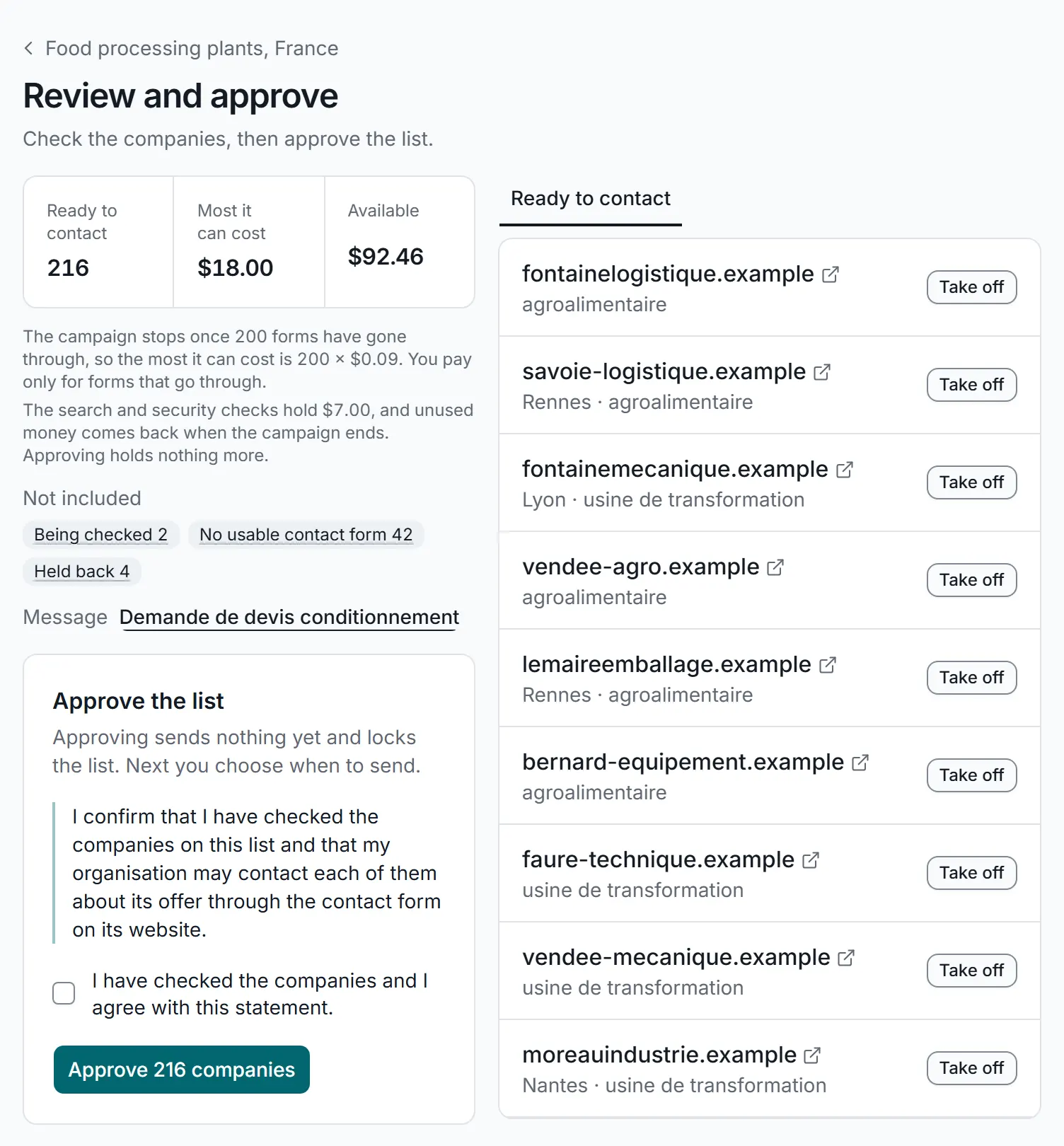
Checking the companies found before you approve the list. A real screen from the app, with sample data.
Already have a list? Then you do not need to search, and there is no search cost. Upload the websites instead (“You bring the list”), as our guide to building a target list explains. You can read more about both ways in on How it works.
Tips for better results
- Start with one country and one group of keywords. Learn from the replies, then widen it.
- Give each saved list a clear name, like “Packaging machines, France”, so you can reuse it.
- Compare two lists to see which companies they share.
- Write the message for the list you found, in that country's language. Our message examples can help you start.