What a target list is
A target list is simply the companies you want to reach. B2B means “business to business”: one company selling to, or working with, another. So in a B2B target list, each line is a company, not a person.
For contact form outreach, each line only needs the company's website, like example.com. You do not need names, email addresses or links to contact pages.
Decide who to target
Before you collect a single company, decide who fits. Answer each question in a sentence:
- What do they do? For example, “dental laboratories” or “food wholesalers”.
- Where are they? Pick one country to start with.
- Why would they want what you offer? If you cannot say why, the message will be hard to write.
- Who should not be on it? Your customers, your competitors, and anyone who has asked you not to write.
Your best customers are a good guide. Look at what they have in common, then look for more companies like them. Keep your answers. You will use them again when you write the message, because the reasons a company fits are the reasons it might answer.
Where lists come from
You can build a good list from sources you can check yourself:
- Search engines. Search for what the companies do, in the country you want. Our guide on how to find companies by keyword shows how.
- Trade associations. Many publish a list of their members.
- Trade fairs. Exhibitor lists show who is active in a market.
- Business directories. Local and industry directories list companies by type and place.
- Your own records. Companies that asked about your work before, old quotes, and companies your team already knows.
- Your client. If you are an agency, the client often has a list to start from.
Why not buy a list? A bought list may be out of date, and you often cannot see where it came from or why each company is on it. A list you build yourself may be smaller, but you know why every company is there. That makes the message easier to write.
Whatever the source, note where each company came from. It helps when you clean the list, and when a company asks how you found it.
Clean the list
Cleaning a list means fixing or removing lines that would waste your message. Go through it once before you upload:
- Keep just the website. One company per line. Remove extra page addresses, so “example.com/contact” becomes “example.com”.
- Remove repeats. The same company can appear twice, written in different ways. The app contacts a repeated company only once, but removing repeats yourself keeps your list easy to read.
- Remove companies that do not fit. Directories, news sites, companies that have closed, and companies outside your target.
- Remove companies you should not contact. Customers, competitors, and anyone who has asked you to stop. Add them to your do-not-contact list in the app, so they are skipped every time.
- Check a few by hand. Open some websites at random and make sure they are what you expect.
Some websites will turn out to have no usable contact form. You do not need to check for that. The app leaves them out, counts them and shows the reason, and you are not charged for them.
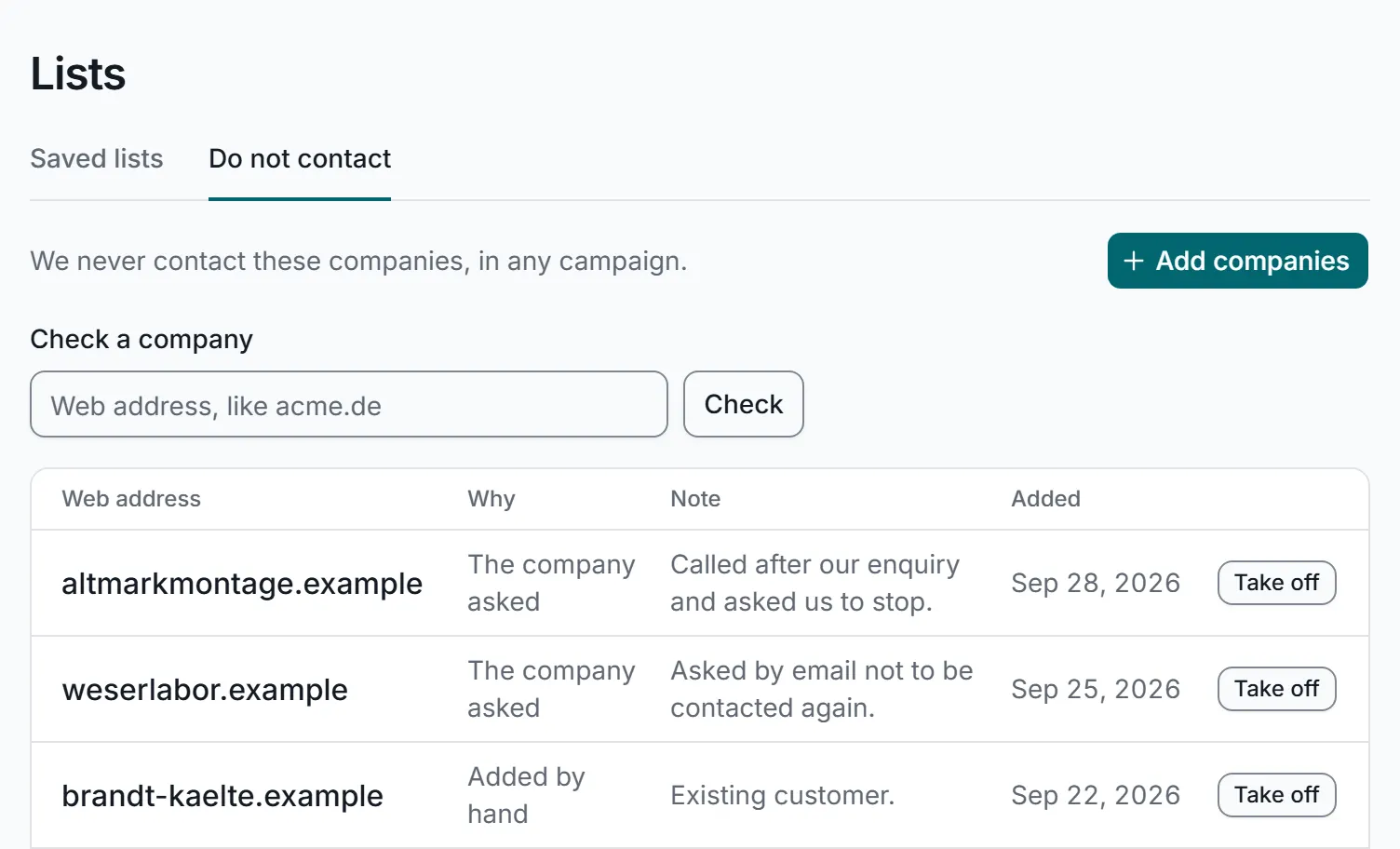
The do-not-contact list: companies on it are skipped every time. A real screen from the app, with sample data.
Upload your list to the app
In the app, this way in is called “You bring the list”. You can:
- paste web addresses,
- upload a spreadsheet (Excel or CSV), or
- start from a list you saved before.
There is no search cost, because you bring the companies yourself. A company that appears twice is contacted once, so nobody gets your message twice from one campaign, and saved lists never hold the same company twice. You can compare two lists to see what they share, add a campaign's companies to a list, and download any list as a spreadsheet.
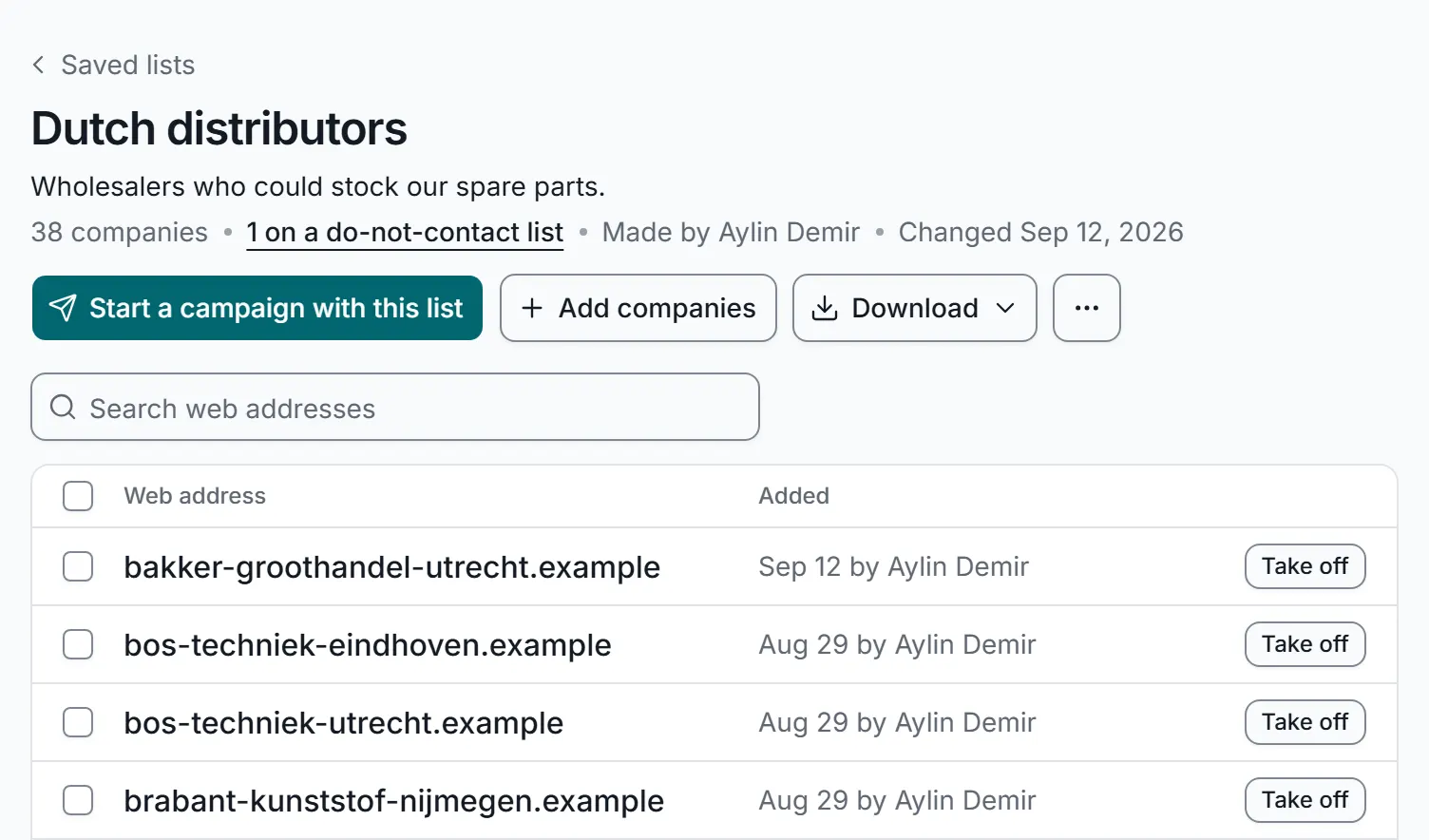
A saved list, ready for a campaign or to download. A real screen from the app, with sample data.
Then write your message, check the companies and the cost, and approve the list. Nothing is sent before you approve it. When you approve it, you confirm that your organisation may contact each company on the list. Rules differ by country, so read Is contact form outreach legal? if you are not sure what applies to you.
Keep the list working for you
- Name lists clearly, like “Food wholesalers, Netherlands”.
- Keep one list per country and type of company, so each one gets the right message.
- Grow it over time. Add companies as you find them, and reuse the list for your next campaign.
- Keep the do-not-contact list up to date. It covers your whole account, and listed companies are always skipped.
When the list is ready, our guide to your first campaign walks you through the rest.