How contact form outreach works

Choose the companies, write one message and approve the list. We send it through the contact form on each company's website, collect the emails and phone numbers the site lists, and bring the replies back to one inbox.

$0.09 for each form that goes through. $10 covers about 111.

Nothing is sent until you approve the list.

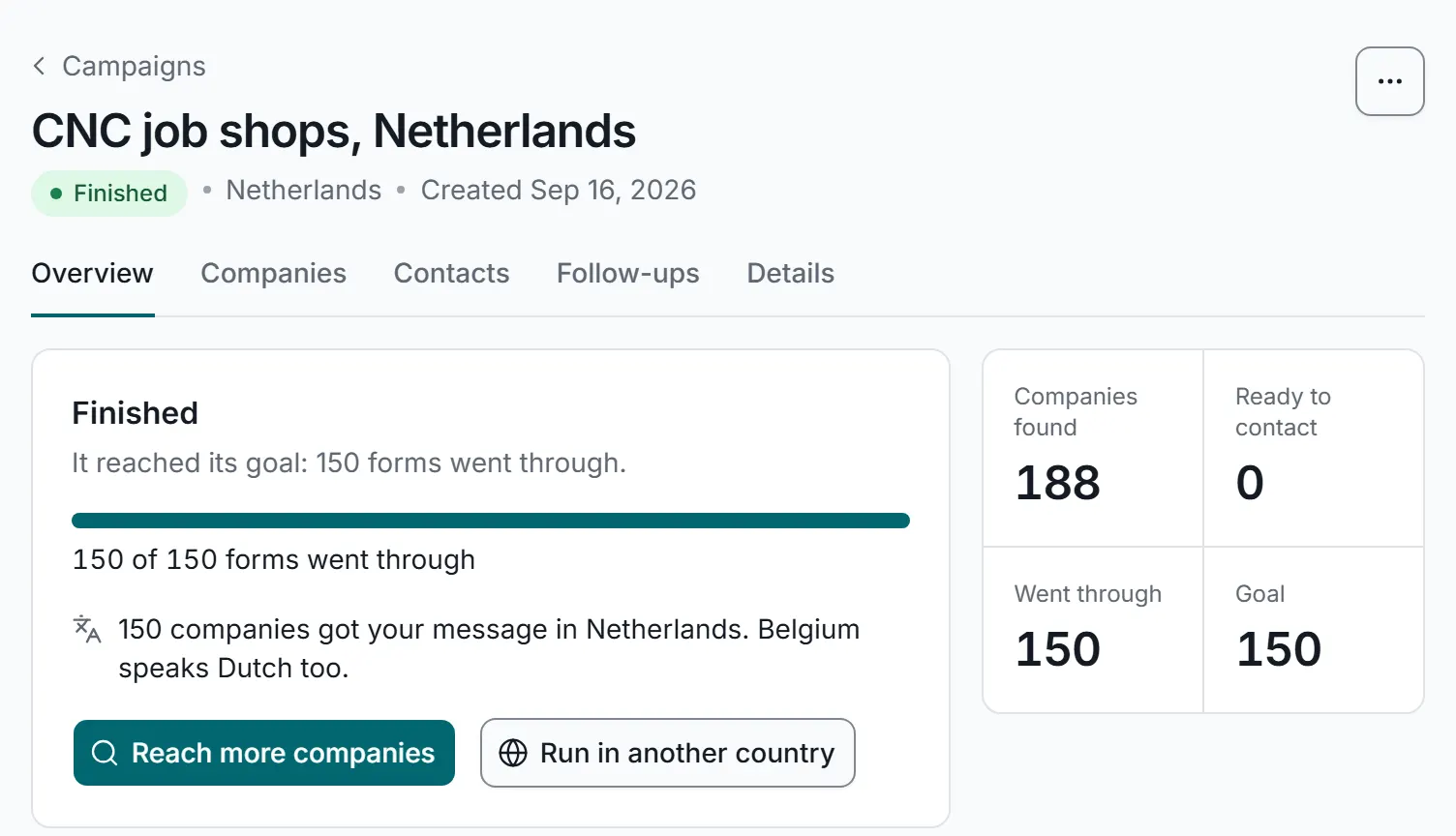
A finished campaign overview, with sample data: 150 of 150 forms went through, 188 companies found, and buttons to reach more companies or run the campaign in another country.

A finished campaign in the app, with sample data.

Under 40 seconds

Watch a campaign from start to download

A silent recording of the app with sample data.

What the video shows: Discover, starting a new campaign by typing keywords and picking a country. Your list, pasting your own web addresses instead. Contacts, a finished campaign's 353 emails and phone numbers from 177 companies. Proof, the form filled in and the page the site showed after sending, each with its address and time. Export, the Download menu offering Excel or CSV.
How you pick companies

We find the companies, or you bring the list

Both ways lead to the same campaign. You can mix them: let us find new companies one week and bring your own list the next.

We find the companies

Find companies by keyword

Best for new markets and finding new customers

Type what the companies do, like "packaging machines", and pick a country. We collect the company websites that rank on search engines today for those keywords in that country.

  • Use the words local companies use to describe themselves
  • Check the list before anything is sent
  • Save it as a list, or download it as a spreadsheet (Excel or CSV)
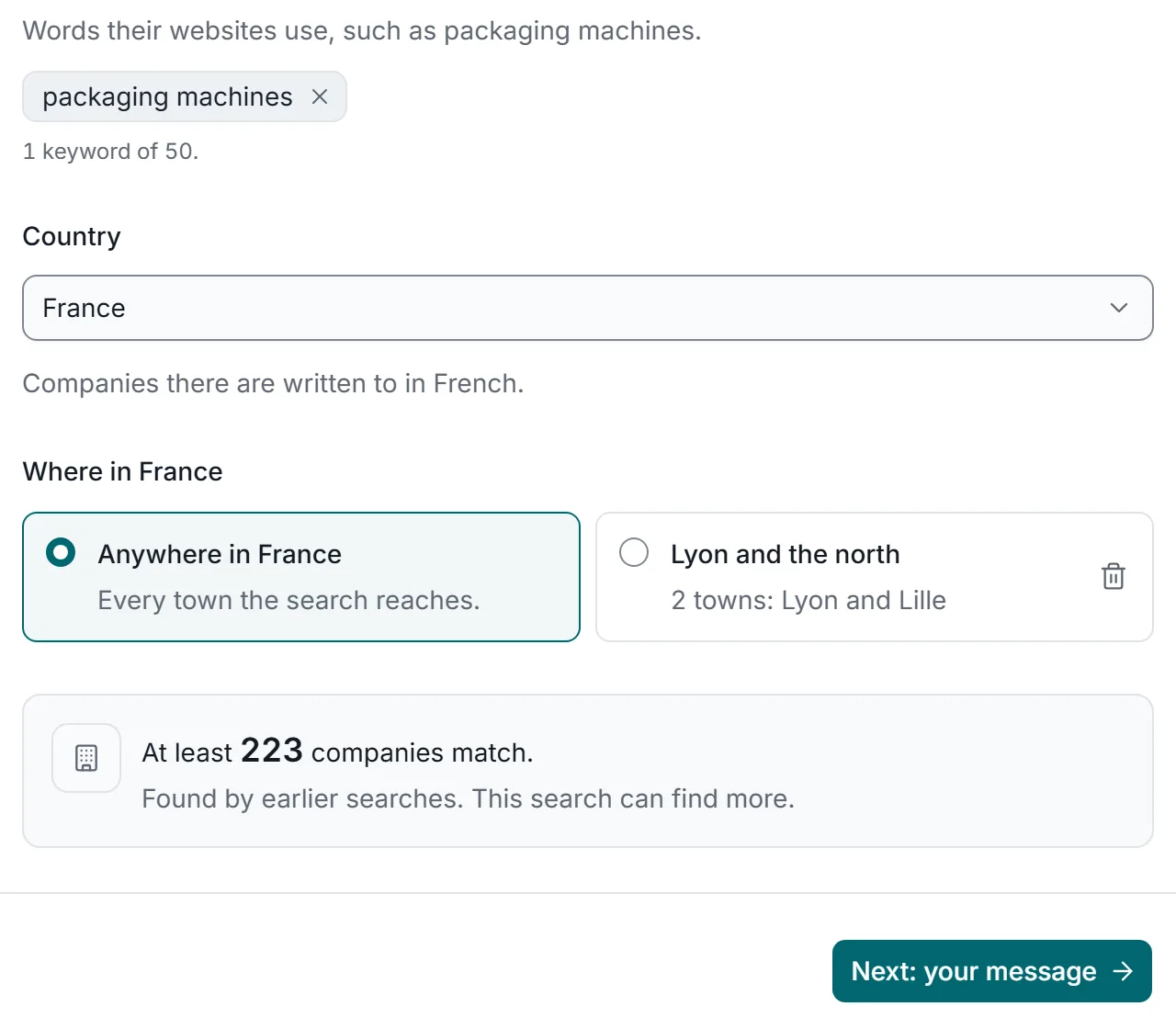
The new campaign page with sample data: typing the keyword packaging machines, adding it, then choosing France as the country.

Price$0.09 for each form that goes through, plus the search cost, shown before you start.
You bring the list

Bring your own list

Best for agencies and lists of companies you already have

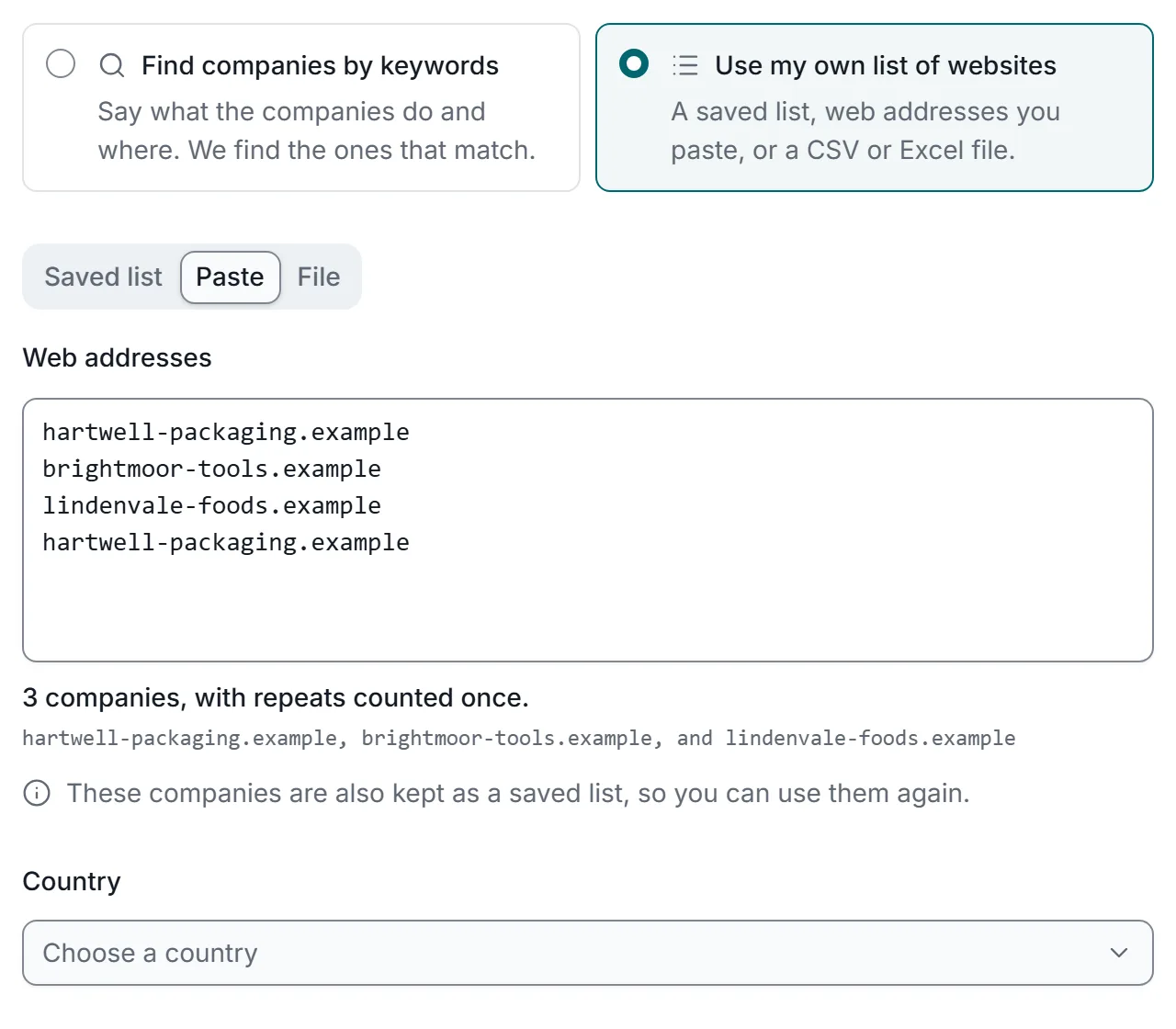
Paste web addresses, upload a spreadsheet or start from a saved list. All we need is each company's website, like example.com. No contact page links and no email addresses.

  • A company that appears twice is contacted once
  • We find each contact page ourselves
  • Start the next campaign from the same saved list
The new campaign page with sample data: choosing Use my own list of websites, then pasting three company websites and one repeat; the app counts 3 companies and drops the repeated one.

Price$0.09 for each form that goes through. No search cost.

Step by step

From campaign to replies

Six steps. You do the first three, in minutes. We do the rest.

  1. Choose the companies

    Let us find them by keyword and country, or bring your list. Websites with no usable contact form are left out and counted, so you can see why.

  2. Write one message

    Write it once, in the language the companies read, and choose the sender details they will see. It is sent exactly as you wrote it.

  3. Check the list and approve

    Take off any company you do not want to contact. Nothing is sent until you approve the list.

  4. We send it

    Each company gets your message once, through the contact form on its own website, during office hours in its country. You can stop a campaign at any time.

  5. Proof and contacts are kept

    For each form that goes through we keep a picture of the form filled in and of the page the site showed after sending, and collect the emails and phone numbers the site lists.

  6. Replies come back

    Answers land in one inbox, matched to their campaign and company. Automatic replies, bounced messages and requests to stop are sorted for you.

Read the step-by-step guide to your first campaign

Approval

Nothing is sent until you approve the list

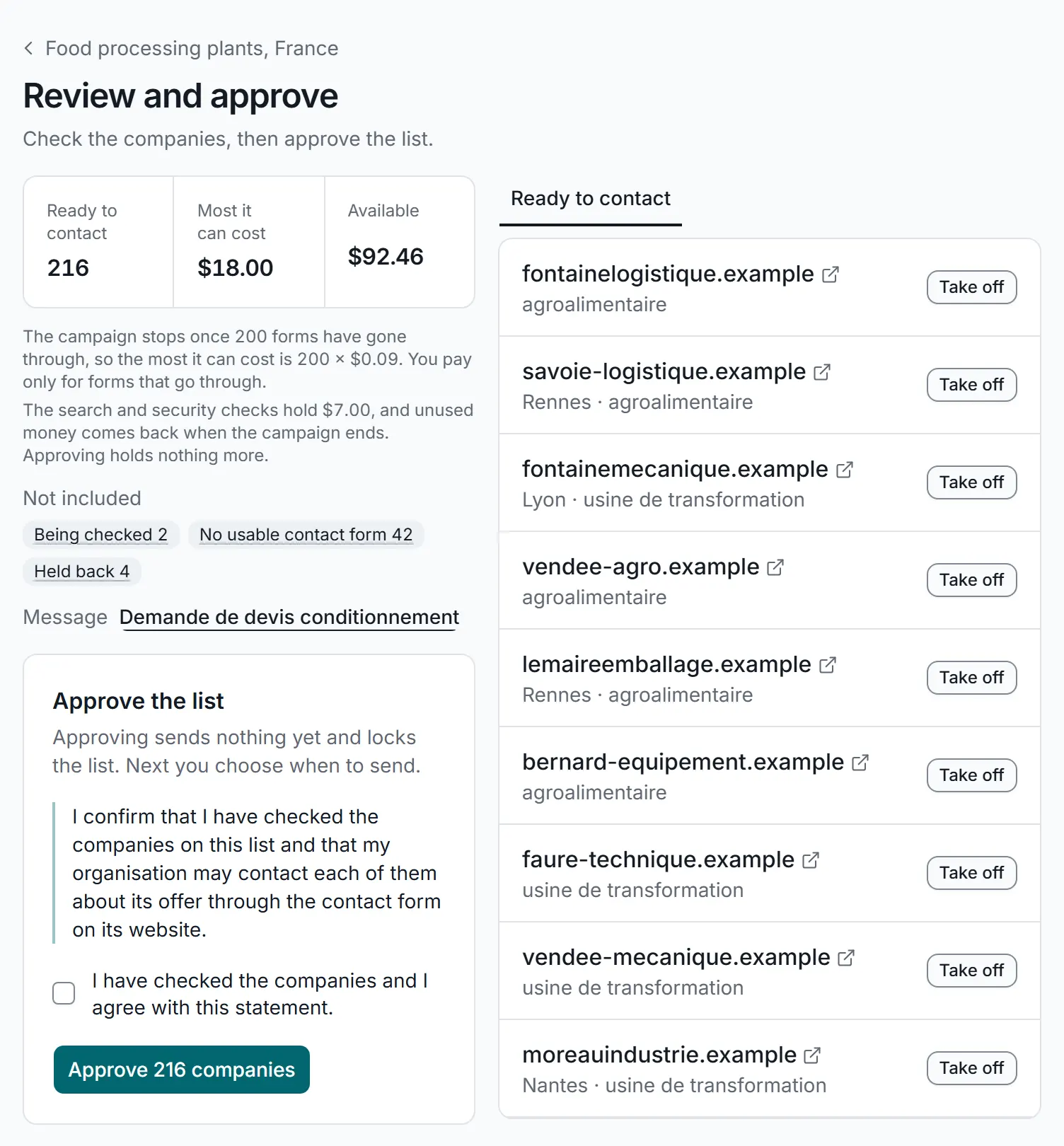
When the list is ready, the campaign waits for you. You see how many companies are ready to contact, the credit set aside for the campaign, and the companies left out with the reason, such as no usable contact form.

  • Take off any company you do not want to contact
  • Confirm you have checked the list and may contact each company about your offer
  • Approving sends nothing yet and locks the list. Next you choose when to send
  • Companies on your do-not-contact list are always skipped

Through the API, approving needs its own permission on the key, separate from sending, so a script cannot send a list nobody has approved. See the API.

Approving a campaign's list, with sample data: 216 companies ready to contact, at most $18.00, the companies left out and why, and the Approve the list card: approving sends nothing yet and locks the list, a statement to confirm with a box to tick, and the button that approves 216 companies.
What you get back

Three things from every campaign

Each one comes with every campaign, at no extra charge.

Messages delivered, with proof

Your message reaches each company the way it asks to be contacted: through its own contact form. For every one you get a dated record.

  • The form, filled in, with its page address
  • The page the site showed after sending
  • A history of every attempt
The proof page for hendriks-machines.example on a phone, with sample data: sent, a reply through the contact form on September 23, delivered on September 20, and a picture of the contact form filled in.

A contact list

While we fill in each form, we read the website and collect the contact details it lists.

  • Emails, landlines, mobiles and WhatsApp
  • Named people where the site lists them
  • The page each one was found on
The Contacts tab of a campaign on a phone, with sample data: 353 contacts from 177 companies, a Download button, and each email address with its type, its company and the contact page it was found on.

Replies in one inbox

Every answer comes back to one place, matched to the campaign and the company it belongs to.

  • Automatic replies and bounced messages sorted out
  • Rules hand replies to the right colleague
  • Requests to stop go on your do‑not‑contact list
The Replies screen on a phone, with sample data: follow-ups to do by hand, each with a Mark done button, filters for automatic replies and mail that came back, and the latest replies with company, date and campaign.
After the first message

Follow-ups and a do-not-contact list

Follow-ups that get done

Plan the next touch for companies that do not answer, see what is due today, and tick it off when it is done.

One do-not-contact list for the whole account

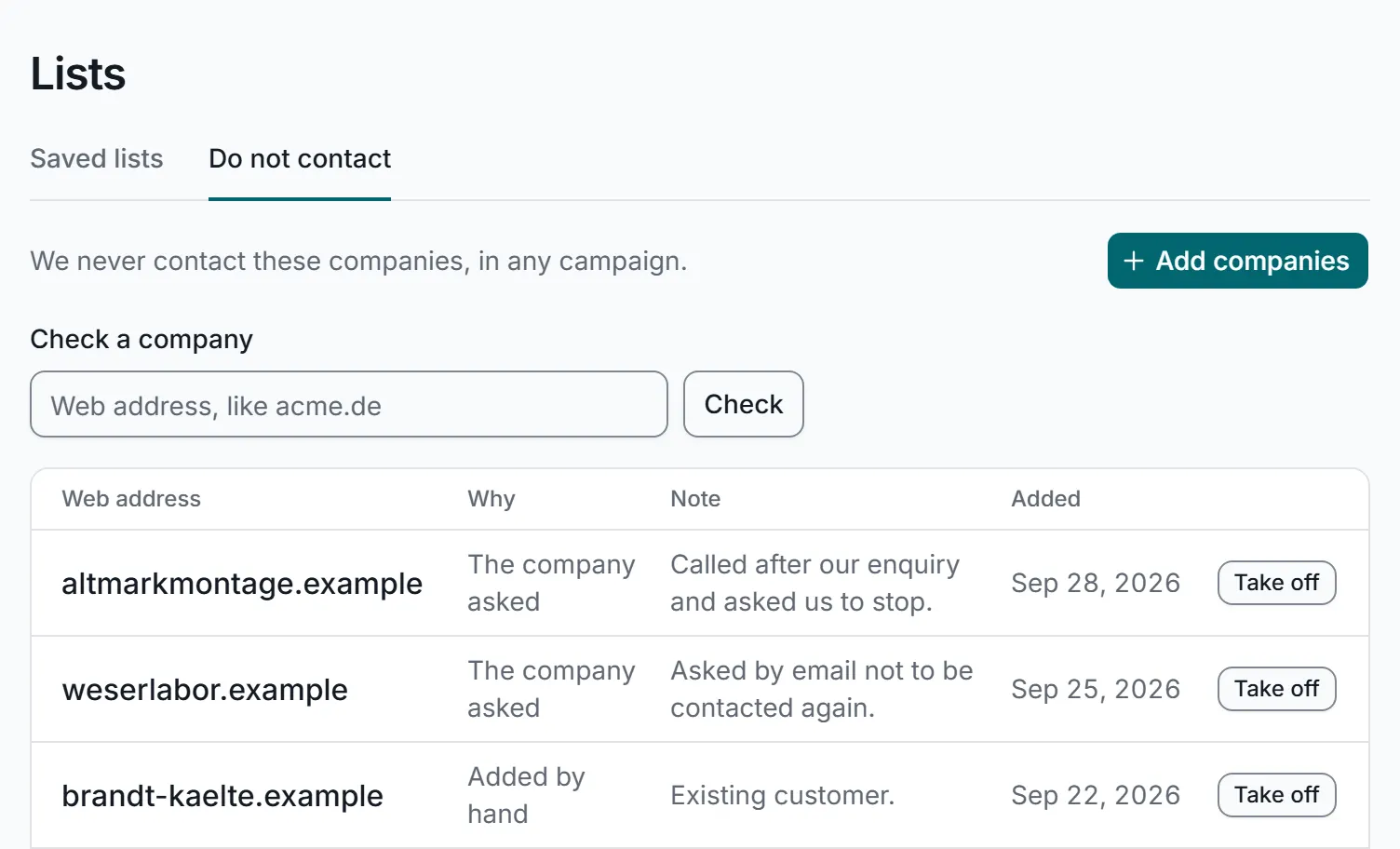
When a company asks you to stop, its reply is marked as a request to stop and the company goes on your do-not-contact list. Add companies by hand too, such as existing customers. Listed companies are skipped in every campaign, whoever starts it, in the app or through the API.

The do-not-contact list, with sample data: a box to check a company, a button to add companies, and each listed company's web address, why it is on the list, such as the company asked or added by hand, a note and the date it was added.

Questions about how it works

Anything not covered here? Email us at hello@contactformoutreach.com.

Do I need contact page links or email addresses?

No. Each company's website, like example.com, is enough. We find the contact page and the contact details ourselves.

What if a website has no contact form?

It is left out of the campaign and counted with the reason, so you see why. If a form cannot be sent later, you are not charged and the $0.09 goes back to your credit.

What about forms with a security check?

Some forms ask a security question before they send. A campaign only pays for help with those if you set an amount for it, and never spends more than that. A form that does not go through costs nothing.

Does finding the companies cost extra?

Yes. When we find the companies for you, the search has its own cost. You see it before you start, and money set aside for it and not used comes back when the campaign ends. Bring your own list and there is no search cost.

Can I write in another language?

Yes. Write your message in the language the companies read. It is sent exactly as you wrote it: the app does not translate.

When are messages sent?

During office hours in each company's country, when someone is there to read them. You can stop a campaign at any time.

Can my own systems run campaigns?

Yes. Through the API your software can start a campaign, check what it would cost, approve its list and send it, then read results, contacts and replies. A list must still be approved before it can be sent.

Run your first campaign today

Top up from $10, enough for about 111 forms that go through. Nothing is sent until you approve the list.