Outreach for every client, from one account
Run lead generation for every client: we find the companies from the words you type, searching included, or you upload each client's list. Send their message through the contact form on each company's website, and show the client exactly what went through. No seat fees, however many people use the account.
$0.049 per sent message. Failed sends are not charged. Searching included. $10 covers about 204.
- $0.049per sent message. Failed sends cost nothing
- Emails + phonescollected from every site
- Prooffor every delivered message
- Any languagewrite your message in any language
At a glance
- How you pick companies
- You bring the list
- Example
- 500 companies on a client's list
- The most the forms cost
- $24.50
- $0.049per sent message. Failed sends cost nothing
- Emails + phonescollected from every site
- Prooffor every delivered message
- Any languagewrite your message in any language
How you pick the companies
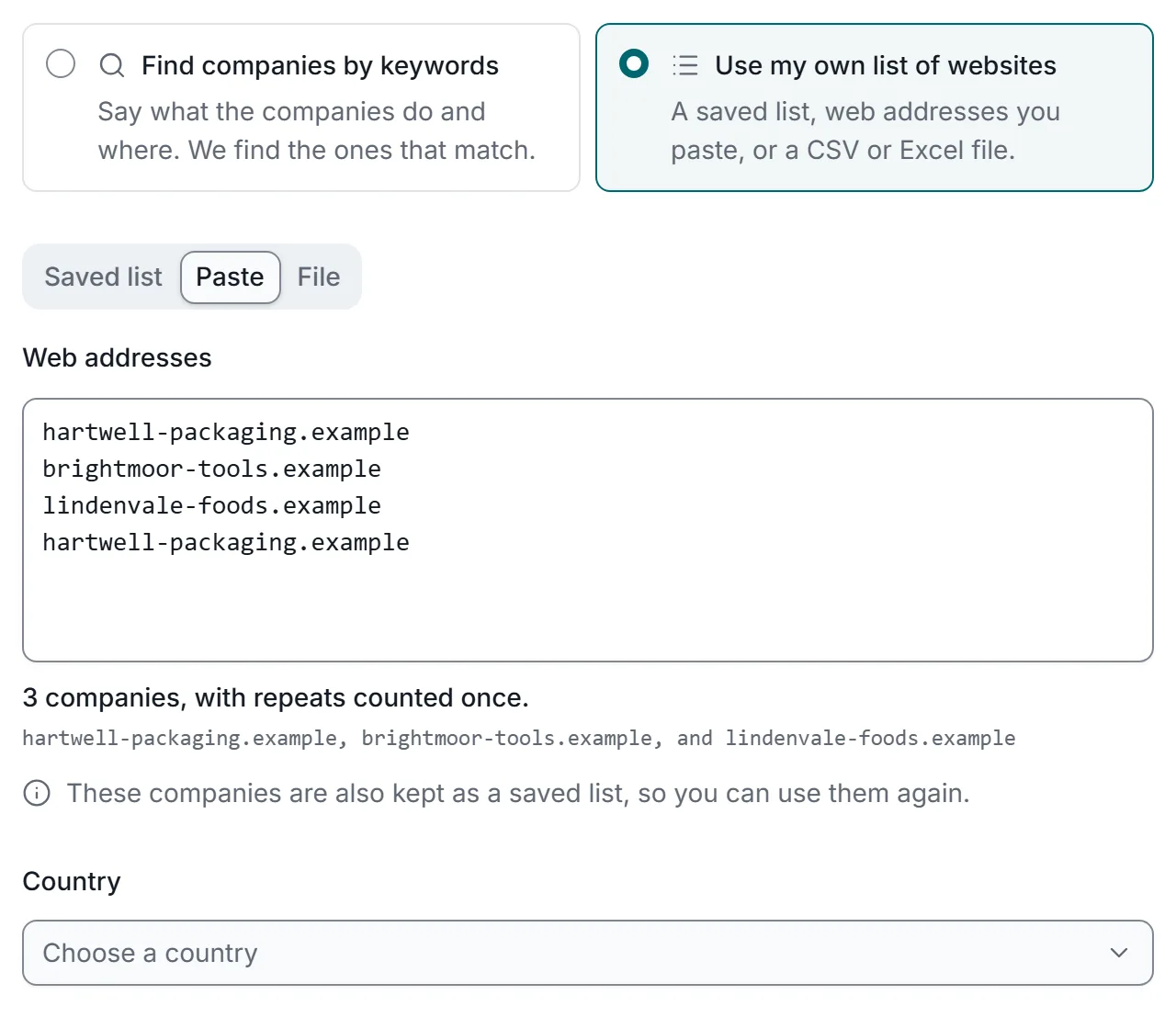
Most agency work starts from a list the client hands over. A list is just company websites, like example.com: no contact page links and no email addresses needed. When a client has no list yet, we can find companies by keyword and country instead, and that search is included in the price.
- Paste web addresses or upload a spreadsheet (Excel or CSV)
- A company that appears twice is contacted once
- We find each contact page ourselves
A client campaign, start to report
Upload the client's list
Paste web addresses or upload a spreadsheet (Excel or CSV). A company that appears twice is counted once, so no company gets the message twice from one campaign.
Write in the client's name
Save sender details for each client: the name, company and contact details companies will see. Write the message once, in the language the market reads.
Approve, then send
Check the companies and the cost, and take off any the client does not want. Nothing is sent until you approve the list.
Report back with proof
For every form that goes through there is a picture of the form filled in and of the page the site showed after sending, with the page address, date and time.
What makes client work easier
A saved list per client
Keep each client's companies as a saved list. Compare two lists to see what they share, and start the next campaign from any of them.
Results a client can follow
Each campaign shows which forms went through, what the websites confirmed, who replied, and a plain reason for every company not reached.
Contacts to hand over
Each campaign collects the emails, phone numbers and named people the sites list. Download them as a spreadsheet for the client.
Replies to the right person
Replies come to your own email, and the app matches each one to its campaign and company. Rules hand them to the right person on your team by country, language or keyword.
Your whole team, no seat fees
Invite colleagues and give each a role. There are no seat fees, however many people use the account.
Works with your other tools
Download contacts as a spreadsheet, or have your developer connect the app to your own software.
500 companies on a client's list, at most $24.50
The sum
500×$0.049=$24.50
The most it can cost, if every message is sent. Failed sends and websites with no contact form bring it down.
No send, no charge
You pay $0.049 per sent message. If a send fails, or a website is down or has no contact form, nothing is charged.
Finding the companies
Your own list costs nothing to add. If we find the companies for you instead, searching is included too.
- Top up from $10. Credit never expires
- No subscription and no seat fees
- Contacts, replies and proof included
- See pricing
Nothing is sent until you approve the list.
Before you start
Does the do-not-contact list cover every client?
Your do-not-contact list covers the whole account. A company that asks to stop is skipped in every campaign you run, for every client.
Whose name do the messages go out under?
Messages go out with the sender details you choose. Use the client's real name and contact details, so companies know who is writing to them. See an example written for a client
What if we run campaigns for several clients each month?
Run every client from one account, each with its own list, campaign and proof. For bigger plans, write to hello@contactformoutreach.com.
Run your next client campaign here
We find the companies for you, searching included, or you upload your own list. Top up from $10, enough for about 204 sent messages. Nothing is sent until you approve the list.