Contact form submitter
A contact form submitter sends your message through the contact form on each company's website: it finds the form, fills it in, answers the security check and keeps proof. Ours is contact form submitter software in the cloud, and the only service that also finds the companies for you, so your contact form marketing starts from a few words.
Finding the companies is free when you send to them. $0.09 for each form that goes through. $10 covers about 111.
- $0.09for each form that goes through
- Emails + phonescollected from every site
- Prooffor every delivered message
- Any languagewrite your message in any language
At a glance
- $0.09
- per form that goes through, at any volume
- $10
- is the smallest top-up, about 111 forms
- Included
- finding the companies and solving CAPTCHAs
- Nothing
- to install: it runs in the cloud
- $0.09for each form that goes through
- Emails + phonescollected from every site
- Prooffor every delivered message
- Any languagewrite your message in any language
The short answer
A contact form submitter is software that fills in website contact forms for you, one company at a time. Some run on your computer, some in your browser. Contact Form Outreach runs in the cloud and does the part the others leave to you: it finds the companies.
- $0.09 for each form that goes through, the same at any volume. Forms that fail cost nothing.
- CAPTCHAs are solved, and every form that goes through comes with two pictures as proof.
- Replies come to your own email. Nothing is sent until you approve the list.
Four jobs on every website
Any contact form submitter has to get these four right, on every site, in any language.
Find the form
It looks for the contact form on each company's website. A website without one is left out, with the reason shown, and costs nothing.
Fill it in
Your subject and message, with your name, company and email for replies, plus your phone, role, website or address when a form asks for them.
Answer the security check
Some forms ask for a CAPTCHA before they send. Ours solves it, and that is included in the price.
Keep proof
A picture of the form filled in and of the page the site showed after sending, with the page address, date and time.
What proof of delivery looks like
Every delivered message comes with a picture of the form filled in and of the page the site showed after sending.
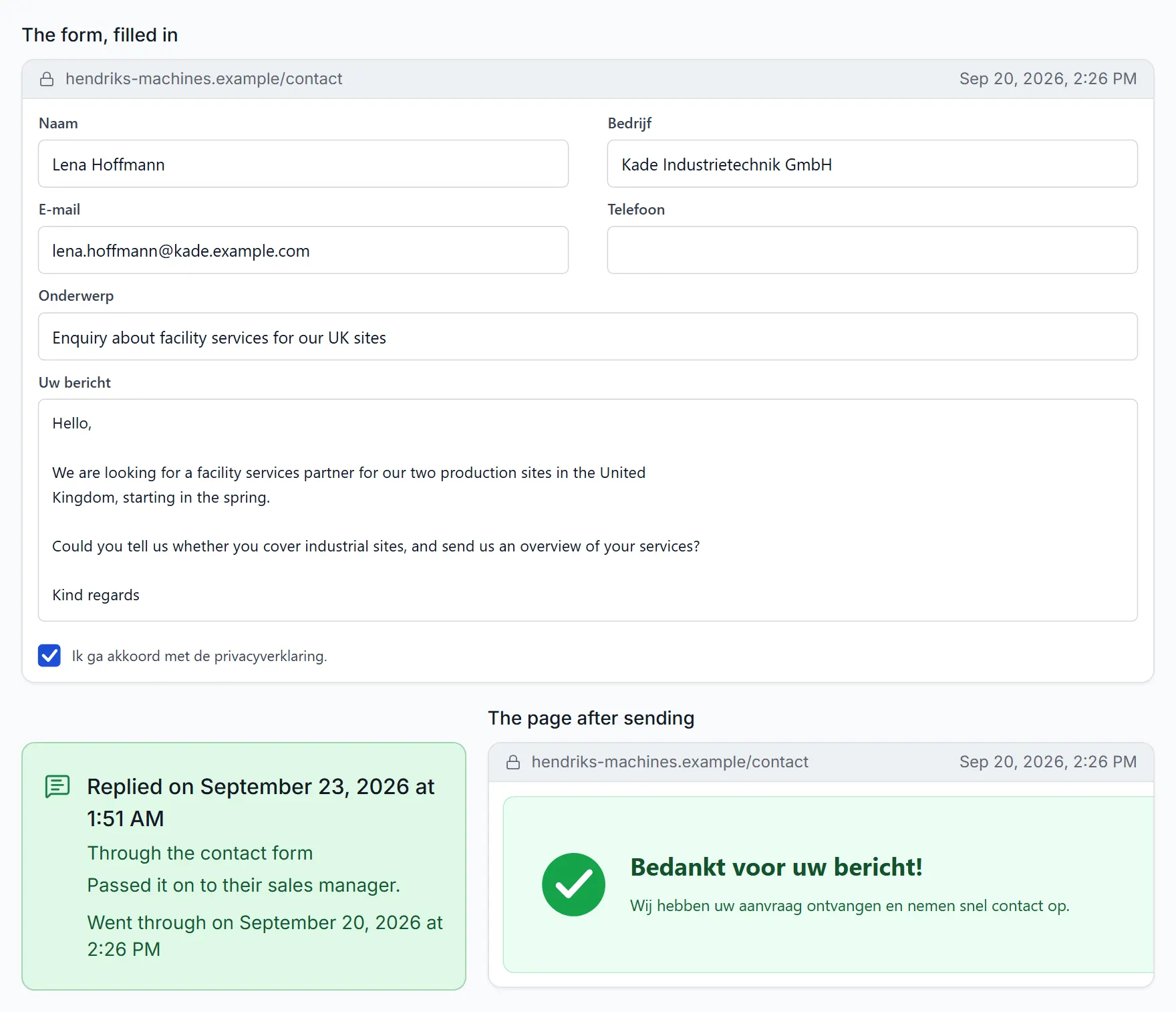
Date and time of delivery
When the website accepted your message, to the minute.
Page address and time stamp
Each picture shows the page address, date and time.
The form, filled in
Exactly what we typed into each box, just before sending.
The page after sending
The confirmation the website showed back.
A form that does not go through costs nothing.
Pictures are kept for 90 days.
Three kinds of contact form submitter
They all fill in forms. They differ in what you install, what has to stay on, and what you pay for on the side.
| Topic | In the cloud, like ours | Software you install | A browser extension |
|---|---|---|---|
| What you install | Nothing. It runs in the cloud | The software, on your computer or a server you rent | An extension in your browser |
| What must stay on | Nothing. Campaigns carry on with your computer off | That computer or server, while it sends | Your browser, usually open on the page |
| Where the companies come from | We find them from the words you type, or you bring a list | Usually a list you bring or buy | Usually a list you bring |
| CAPTCHAs | Solved, included in the price | Often a paid solving service on top | Often left to you |
| What you pay for | $0.09 for each form that goes through | A licence, and often proxies and lists on the side | Usually a plan, whatever goes through |
Already send cold email? Keep it as an add-on for the one named person you need to reach. Forms and cold email compared
Bulk contact form submission
Thousands of companies in one campaign, and still one message to each.
- 10,000
forms in one campaign, at most
- 50,000
web addresses in a list you bring
- 5,000
companies found in one search
- Once
per company, in its office hours
Across about 10,000 test sends, 90 to 96% of websites with a contact form took the message, protected sites included. See how it works
The full price list
One price for the forms that go through, and two one-cent lines you can avoid. Nothing else.
| What | Price | How it works |
|---|---|---|
| Each form that goes through | $0.09 | The same at any volume, no volume discounts and no subscription. |
| A form that does not go through | $0 | The money goes back to your credit. |
| Finding the companies | Included | Type what they do, pick a country and how many. |
| Solving CAPTCHAs | Included | A security check never adds to the price. |
| A company found with a form that you leave out | $0.01 | Only if you take it off the list. Send to every company found with a form, and the search costs nothing. |
| A website found from a company name | $0.01 | When you bring names instead of web addresses. It comes back once that website is sent an enquiry. |
| Smallest top-up | $10 | Enough for about 111 forms that go through. Credit never expires. |
Watch a failed form come back
Example with a $10.00 top-up: two forms are sent at $0.09 each, leaving $9.82. The next form could not be sent, so its $0.09 is returned and the balance stays at $9.82. The next form is sent, leaving $9.73.
1,000 forms that go through: $90. See pricing
Contact form automation, from list to replies
You approve once. Everything below then runs by itself, and none of it adds to the price.
Approve before anything is sent
You see the whole list first and take off any company you do not want.
Sent in office hours
On weekdays in each company's country, never on its public holidays. Stop a campaign whenever you like.
A reason for every company
Each company not reached is listed with a plain reason: no form, site down, form refused.
Contacts while it sends
The emails, phones and WhatsApp numbers each site lists, ready as Excel or CSV, at no extra cost.
Replies to your own email
Companies answer the address in your sender details, so you reply from the mailbox you already use.
Connects to your own software
Through the API and webhooks, your software or CRM can start a campaign and read results and contacts.
Using a submitter within the rules
A submitter only changes how the message is sent, not what the law asks of it. In some countries a business may be written to first; in others it has to agree first.
Good habits for any campaign:
- Use the contact forms companies put on their own websites
- Write to businesses about their business
- Say who you are and how to reach you
- Stop when a company asks you to
The official sources we checked on 14 October 2026 include the FTC's CAN-SPAM guide for the US, the ICO's business-to-business rules for the UK, CASL for Canada and section 7 of the UWG for Germany. General information, not legal advice. The rules country by country
Questions about contact form submitters
Questions before your first campaign? A person answers at hello@contactformoutreach.com.
What is a contact form submitter?
A tool, also called a website contact form submitter, that sends your message through the contact form on each company's website instead of to a guessed email address. A good one also finds the form, answers the security check, keeps proof and tells you which forms went through.
Do I need to install anything or keep my computer on?
No. Finding the companies, filling in the forms, solving CAPTCHAs, the proof and the contact details all run in the cloud. Close the app or switch off your computer, and your campaigns carry on.
Do I need my own list of websites?
No. Type what the companies do, pick a country and how many, and we find them for you. If you have a list, paste the websites or upload a spreadsheet of up to 50,000 web addresses instead.
Can it fill in forms with a CAPTCHA?
Yes. Solving CAPTCHAs is included in the $0.09, and a form that still does not go through costs nothing.
How many of the forms go through?
It depends on the trade and the country: some websites have no contact form, and some forms refuse a message or ask for a detail you did not give. Across about 10,000 test sends, 90 to 96% of websites with a contact form took the message, protected sites included. Each campaign shows how many went through, with a plain reason for every company not reached.
What does bulk contact form submission cost?
$0.09 for each form that goes through, flat, with no volume discounts: 1,000 forms cost $90. Finding the companies and solving CAPTCHAs are included. Two small charges can apply: $0.01 for a company found with a form that you leave out, and $0.01 for a website found from a company name, which comes back once that website is sent an enquiry. Top up from $10.
How do I keep bulk sending welcome?
Write one short message that is relevant to the companies you picked. Each company gets it once, in its office hours. A list never holds a company twice, and companies on your do-not-contact list are always skipped.
Is using a contact form submitter legal?
Rules differ by country. Some countries treat unsolicited advertising sent through a contact form like advertising email, which can need the company's consent first. Check the rules where the companies are, or ask a lawyer. It is general information, not legal advice.
Start your first contact form campaign
We find the companies for you. Top up from $10, enough for about 111 forms that go through. Nothing is sent until you approve the list.